Are you a patient?
Lux.Doctor
Specialty:Endocrinology and diabetology
(+352) 661 96 22 16 Try free for 30 days

The next‑generation medical management solution.

Lux.Doctor brings together the patient record, official forms, billing with PID 2.0 and the practice calendar in one application, installed on your practice’s computers and connected to Luxembourg’s health services.

Not a cloud service

Your data stays yours — forever

Three questions to ask before you choose practice software — and our answers.

GDPR: who can read your patients’ medical records?

Only your practice.

They stay on your computers, and nobody else can open them.

What if you stop paying?

Nothing is locked.

In 20 years you’ll still open the software and see all your data.

What if the Internet drops?

The consultation goes on.

Everything is on your computers.

Backups, your way

Turn them on in the settings: one, the other, or both.

Online backupOn our servers in the EU, so you can restore all your data whenever you need to.Encrypted: nobody but your practice can read it, not even us.
Local backupOn your own computer or a USB stick.
Labelled by the Agence eSantéFor PID 2.0, digital reimbursement and eCIT, and compatible with the DSP.
Guided migrationYour patients’ history comes across from your previous software.
Unlimited workstationsThe front desk and consultation rooms work on the same data.
Support that answersWe usually reply within one hour.

1Before the tour

What is your specialty?

Pick yours: the tour, the forms and the examples below change with it.

Made for endocrinology and diabetology

Endocrinology and diabetology

Thyroid, diabetes and metabolism follow-ups with the lab results on a graph, dietetic care prescribed on the CNS form, and your report back to the GP.

  • Dietetics prescriptionDietetic care, prescribed according to the nomenclature.
  • CNS therapeutic protocols: 10 coverage requests NewTen CNS coverage requests: Ritalin (extension), Repatha, Praluent, Leqvio, Nilemdo, Nustendi, pulse oximeter, extensively hydrolysed protein formulas, amino-acid-based dietary products and Ontozry.
  • Hospital stays billed day by dayFlat-rate fees for a hospital stay, one dated line per day, with the Sunday and public-holiday variant.
  • Letters to colleaguesOne letter goes to several colleagues in a single print run.
Also included
  • Medical imaging request
The software in action

The practice, in real time.

What you use every day, from the patient record to your patients’ app.

01Patient record

The whole patient on one screen

The history, current problems, long-term treatments and allergies stay in view while you write the consultation — then one click saves it to the patient’s history.

  • History at a glance
  • Allergies and treatments always in view
  • Everything saved as you go
02Prescription

A prescription built with a few ticks

Tick the lines to renew in the history or in the chronic treatments, or type the first letters of a medicine and pick it from the list: each line goes straight into the prescription, with its dosage, ready to print on the CNS form.

  • Lines from several prescriptions at once
  • Any medicine in a few letters
  • Printed on the CNS form
03Sent to the CNS

Straight to the CNS, from the record

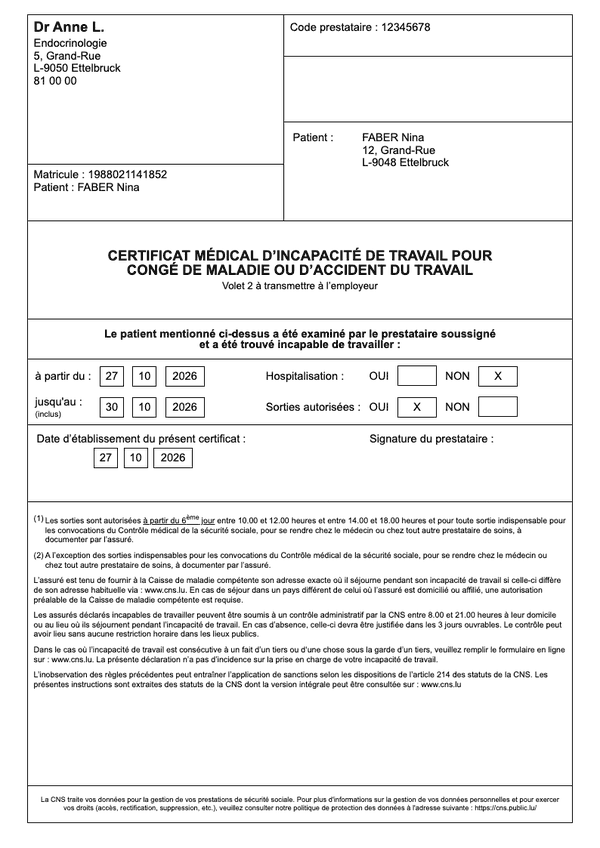
Certificates of incapacity for work are filled in from the record and sent electronically through the CNS platform; your patient finds them in their MyGuichet. Invoices go too: with PID 2.0 the CNS pays you its share directly, and a fee note can go to the patient’s MyGuichet for digital reimbursement. While it is being sent, a certificate is locked, and a sent one can be properly cancelled. Once sent, the certificate appears on the official form, ready to print.

  • Favourite diagnosis codes
  • Fee notes for digital reimbursement
  • Cancel and replace
04PID 2.0 invoice

Bill in PID without leaving the record

One click on the act code and PID computes the coverage (CNS share and patient share); you take payment, print — and the invoice is filed.

  • Codes checked against the Livre bleu
  • CNS refusal reason shown
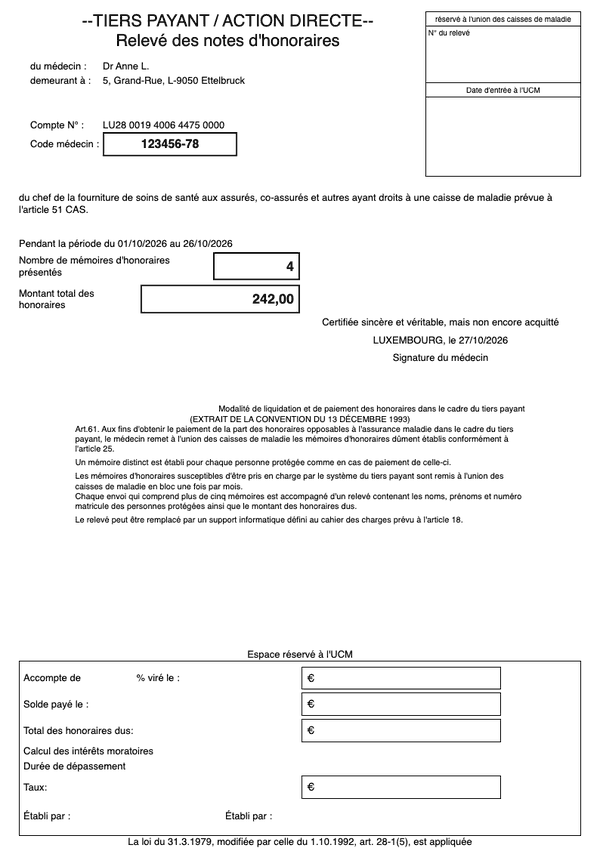
  • Third-party payment and statements
05Results

Results arrive as tasks

Each RegiBox result lands on the task board for the right person and goes into the right patient’s record. The card shows the values flagged by the laboratory; one click opens the result next to the previous values.

  • Values flagged by the laboratory
  • Previous values alongside
  • Scans arrive the same way
06Email

Your email, connected to the records

Gmail, Outlook and other mailboxes, read in Lux.Doctor. When a patient writes, their name and “Open record” appear, and your reply attaches any document from their record in a few clicks, such as a copy of an invoice.

  • Open the record from the email
  • Documents from the record sent as attachments
  • Attachments filed in one click
07Calendar

An appointment booked in three clicks

The free slot, the patient found on two letters, the reason that sets the duration and the colour — and the appointment is on the grid. Day or week view, with your working hours respected.

  • Day and week views
  • Colour by reason
  • Working hours respected
08Waiting room

The whole day runs from a single list

At the front desk every patient of the day is a card: arrived, in consultation, ready to pay. One button moves the visit forward, the service is billed from the same card — and the next patient moves up on its own.

  • Waiting, in consultation, payment
  • Billing on the patient’s card
  • Video started from the card
09Patient app

Your patients book from their phone

Their requests land in your calendar: you approve or decline in one click, no slot is ever forced on you. Unlimited free push and e-mail reminders — fewer missed appointments.

  • Free for patients
  • Available in 11 languages
  • Video consultation in the browser

01Patient record

The whole patient, on one screen.

During the consultation, everything about the patient stays in front of you: their history, today’s consultation, their permanent data and graphs. Every entry is saved as you go, without you having to think about it.

Pinned patient tabs

Several records stay open as tabs in the header — siblings, for example — and one click switches patient.

Instant patient search

Find a patient by last name, first name, phone number or matricule, even just part of it, from the search bar on any screen.

Health parameter graphs New

Weight, BMI, blood pressure, pulse, temperature and SpO₂ entered during consultations, plotted over one, three or five years.

Family circle and legal guardian

Parents, siblings, spouse and guardian are linked to the record, and Lux.Doctor suggests the links that follow from them.

Medical spell check New

Mistakes are underlined in the record, the composer, emails and the chat, with dictionaries that know Luxembourg’s medications, ICD-10 and the CNS nomenclature.

Also in patient record

  • The patient record on a single screenEverything about the patient stays in front of you throughout the consultation, without switching screens.
  • Complete chronological historyReview the patient’s journey in an instant.
  • The patient’s permanent dataThe essentials about the patient are visible at every consultation and never wiped by a new visit.
  • Structured consultationClear, consistent notes from one visit to the next.
  • Creating a patient, with a matricule checkClean records from the moment they are created, with no wrong matricule and no duplicate patients.
  • Patient record export to PDFAn access request, a handover to the patient or a change of treating doctor is handled effortlessly.

Included as well

  • Patients without a Luxembourg matricule
  • No entry ever lost
  • Consultation templates (Ctrl+Space)
  • Health parameters with automatic BMI
  • ICD-10 codes in the consultation
  • Consultation draft saved automatically
  • Reuse a previous consultation
  • Earlier values of permanent data
  • The patient’s supplementary insuranceNew
  • Permanent “Memo” note
  • Dated notes about the patient
  • Actions on every history entry
  • Long letters collapsed in the historyNew
  • Edit a saved consultation
  • The patient’s invoices in the record
  • Record export to WordNew
  • Copying the patient’s data
  • “Patient information” block
  • Patient list
  • Patient deletion with safeguards

02Prescriptions

Prescriptions in seconds, on the CNS form.

The composer, at the bottom of the record, prepares prescriptions, lab test requests and texts in seconds. CNS prices and reimbursement, the Vidal monograph, usual dosages, templates and renewals are all a click away.

Printed on the CNS form, boxes ticked on screen New

The prescription prints on the official CNS form. The “Urgence”, “Nuit”, “Pour trousse” and “Préventif” boxes are ticked on screen, and a note of up to 300 characters, with the patient’s weight if you wish, prints under “Remarque(s)”.

  • The new CNS format, or the old one
  • Issue and expiry dates, accident details where relevant
  • Free text on the same form, PDF download

Prescription checked by VIDAL New

“Check with VIDAL” sends the prescription to VIDAL Sécurisation through eSanté, and its report lists interactions, contraindications and redundancies. VIDAL receives the drugs, sex and date of birth, never the name or the matricule.

Chronic treatment lists New

Long-term medications are kept as lists with their dosage; ticking a line puts it into the current prescription.

Lab tests picked from the catalogue New

An icon in the composer opens the catalogue of almost 700 lab tests by category, with their CNS codes. Tick tests with a click or find them by name or code, and they are written into the request.

Also in prescriptions

  • Prescription composerA complete prescription in seconds, without leaving the record.
  • Medications with CNS prices and reimbursementThe right medication at the right strength, with its price, the CNS reimbursement rate and the patient’s share.
  • Built-in Vidal monographCheck a drug as you prescribe, without leaving the prescription.
  • Your usual dosage, pre-filled NewLess typing and consistent prescriptions.
  • Renewal from the historyA renewal in seconds when the patient comes back.
  • Templates for prescriptions, texts and lab panelsYour recurring prescriptions, ready in one click for the next patient.
  • Automatic fields in text templatesPersonalised letters and reports without copying out the record.

Included as well

  • Edit a saved prescription
  • Blank prescriptions

03Certificates and forms

All the official forms, filled in from the record.

Certificates, prescriptions and requests are filled in from the record, ready to send or to print. Every document can be edited, copied or reprinted from the history.

Sent electronically to the CNS

Filled in from the record and sent through the CNS platform: your patient finds the certificate in their MyGuichet.

  • Electronic certificate of incapacity for work (eCIT)Filled in from the record in seconds and sent to the CNS; your patient receives it in MyGuichet.
  • Sending to the CNS, under controlNew
  • Cancelling a certificate already sent
  • Report of certificates exchanged with the CNS
  • Favourite diagnosis codes

Printed on the official form

Filled in from the record, ready to print on the CNS or official form, or to keep as a PDF.

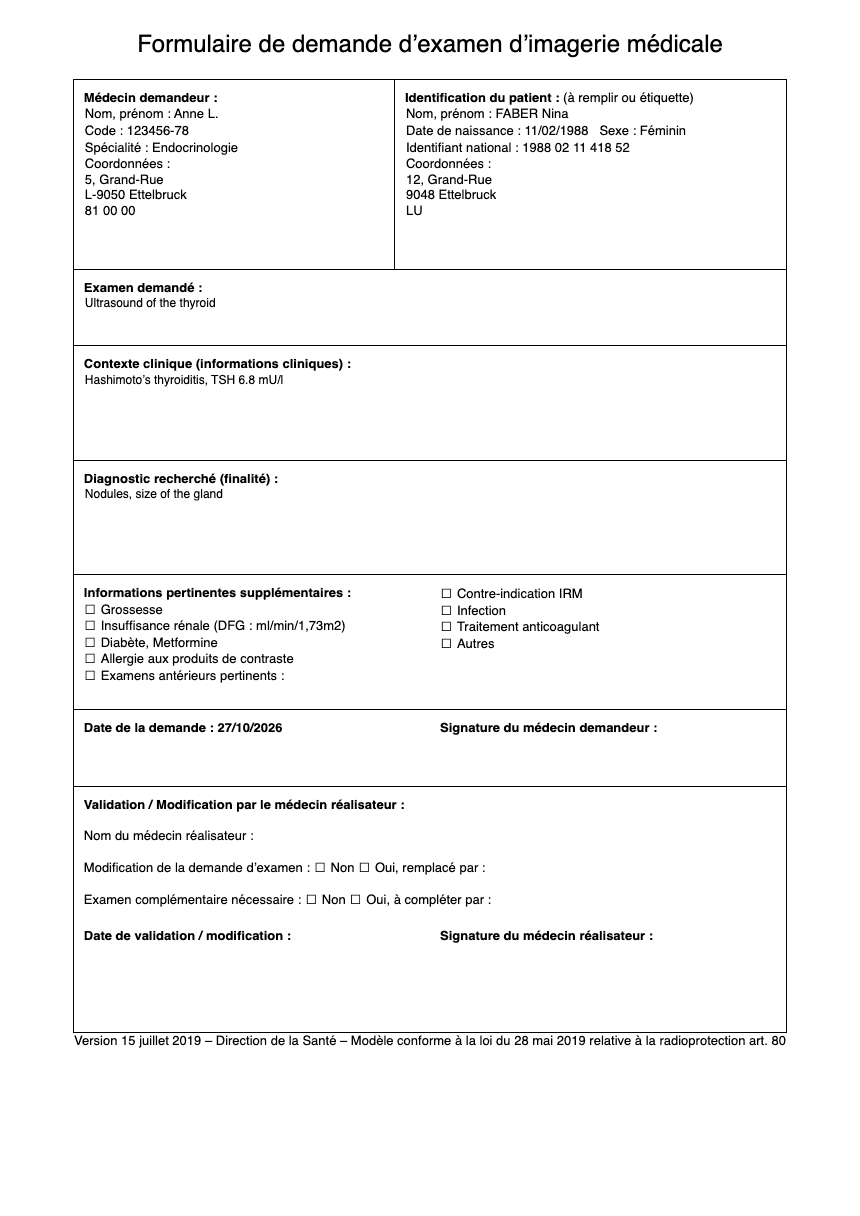
Medical imaging request

The request specifies the examination, the clinical context, the diagnosis sought and the contraindications: pregnancy, renal failure, metformin, contrast agent allergy, MRI, anticoagulants.

    All the forms

    Prescriptions for other professionals

    • Nursing care prescriptionNew
    • Dietetics prescription

    Requests

    • Medical imaging request
    • Pathology request — general (LNS)New
    • Constitutional genetics request (LNS)New
    • CNS therapeutic protocols: 10 coverage requestsNew
    • Transfer abroad for treatment: prior authorisationNew

    Certificates

    • Attendance certificate

    Can’t find the form you need? Write to contact@lux.doctor and we’ll add it within a week.

    Also in certificates and forms

    • Edit or copy a certificate or form NewA complex form is redone in one click, without retyping everything.
    • Letters to colleaguesOne letter goes to several colleagues in a single print run.

    Included as well

    • Choosing which copies to printNew
    • Save a document without printing itNew

    04Billing and accounting

    Billing that follows the consultation.

    PID 2.0 invoices in one click from the patient record, codes checked against the Livre bleu (the CNS nomenclature and its rules), third-party payment, statements and payment reminders. Incoming transfers are matched to invoices from your bank statement, and your accountant receives ready-to-use reports.

    Your invoices mark themselves paid

    No more ticking off line by line: transfers from your bank statement are matched to their invoices, and you confirm.

    • Bank statement import
    • Matched by number, name or matricule
    • CNS payments included

    CNS rejections: reason, dispute and resubmission

    When the CNS rejects a line, its exact reason is shown. Dispute it with a justification, or resend the invoice in one click.

    CNS statements

    Third-party payment invoices are grouped into statements, with the cover sheet and the detailed list as PDFs; payments are ticked off line by line.

    Payment reminders for unpaid invoices

    A sent, unpaid invoice moves to reminder 1, then reminder 2, then court, at 30-day intervals — by post or by email.

    Also in billing and accounting

    • Code checks against the Livre bleu NewFewer CNS rejections over a combination or a suffix.
    • Billing with PID 2.0The patient pays only their share, and the CNS pays you its share directly.
    • Bill without leaving the patient recordThe invoice is done in one click at the end of the consultation.
    • Financial dashboardYour practice’s financial health on one screen.
    • Entering services from the nomenclatureA correct invoice first time, without hunting through the nomenclature.
    • Fees based on the index in force on the date of service NewThe right fee, even for an older service or one billed after an index change.
    • Services covered by the AAACompliant accident invoices, grouped into statements afterwards.
    • Social third-party paymentThe patient doesn’t pay upfront, and the practice gets paid through statements.
    • Invoice sent to the patient’s MyGuichetNo more envelopes, and easier reimbursement for the patient.
    • Invoices and reminders by email NewYour reminders go out in one click, without a stamp.
    • Reports for your accountantHand over your accounts without digging through binders.
    • Standard invoiceInvoices outside PID, however the patient pays.
    • Invoice managementYou always know what has been paid and what is still to do.

    Included as well

    • Code templates
    • Automatic RCAM increase
    • Unpaid patient share of a PID 2.0 invoice
    • No lost or duplicate invoices
    • Invoice in a window over the page
    • Convert a standard invoice to PID 2.0
    • Codes outside the nomenclature
    • Fees increased by 66% or reduced to 66%
    • Other third-party payers
    • Invoices addressed to the paying organisationNew
    • Actions on several invoices
    • Invoice bin
    • Custom payment methods
    • Practice bank accounts
    • Statistics by code
    • Free-form invoices
    • Document header and invoice numbering

    05Results and documents

    Results and documents file themselves.

    Results from RegiBox (the Agence eSanté’s secure messaging service), scans, files and photos from your phone land in the right record, often without any handling at all. Lab results read as a table and can be followed on graphs.

    Lab results, as a table and on graphs New

    HbA1c, creatinine or LDL cholesterol from RegiBox results on a graph, with the laboratory’s reference range in the background and the table of results below.

    • Haemoglobin, ferritin, CRP, glucose, HbA1c, creatinine, GFR, LDL, TSH, PSA
    • Units converted so all results sit on the same axis
    • Values flagged by the laboratory shown in red

    Phone photos straight into the patient record

    Photograph a wound, a lesion or a document with the “Lux.Doctor for Doctors” app; the photo arrives instantly in the record open on the practice computer.

    Drag and drop files into the record

    A file dragged onto the history joins the record with a title, a label, a date and a note — PDFs, images, Word, Excel and more.

    Also in results and documents

    • RegiBox results filed automaticallyNo more downloading results and filing them by hand.
    • Results and scans, all in one placeEvery result arrives in the same place.
    • Scanning straight into the recordPaper enters the record without going through other software.
    • Text recognition (OCR)Scanned documents become readable, searchable and easy to file.
    • Patient labelsSample tubes and paper files labelled without errors.

    Included as well

    • Assigning a document to the right patient
    • Stamp and signature on PDFs
    • RegiBox starts with Lux.DoctorNew
    • Failed scans explained and restartedNew
    • Built-in file preview
    • Word document previewNew
    • Image and X-ray preview
    • File labels
    • Handwritten notes from a reMarkable tablet

    06Email

    Email, filed in the right record.

    No more separate email program next to your medical software: the practice’s mailboxes work inside Lux.Doctor, and a patient’s attachment goes into their record in one click.

    Your mailboxes, with patients recognised New

    Your Gmail, Outlook and IMAP mailboxes inside Lux.Doctor. Emails from patients are recognised, an attachment goes into the right record in one click, and images and tracking stay blocked.

    • Gmail, Outlook and IMAP mailboxes
    • “Unread”, “Patients” and “Flagged” filters
    • No images, external content or read receipts

    Included as well

    • Mailboxes connected by a setup wizard
    • Patient email templatesNew

    07MedChat

    Messages inside your practice.

    MedChat is your practice team’s own messaging, and it opens inside Lux.Doctor.

    MedChat

    Doctors and secretaries, in one conversation.

    The front desk and the doctors write to each other instead of knocking on the consulting-room door: a patient who wants to move an appointment, results that came in the post, a question between two patients. One to one, or in a group for the whole practice.

    • Files in the conversationA scanned result, a letter or a photo goes from the front desk to the doctor: PDF, Word documents, photos and videos up to 25 MB.
    • Everyone writes in their own languageOne-to-one messages are translated into the reader’s language, out of 81, and group messages into French or German. The original stays one click away.
    • A group for the whole practiceThe practice’s doctors and secretaries in one conversation, for the day’s changes and the team’s questions.
    • A secretary’s account can be linked to up to 20 doctors.
    • Opens from each doctor’s session in Lux.Doctor, with the number of unread messages.
    • Push notifications, and an e-mail when a message stays unread for 10 minutes.
    • Sign-in with a code sent by e-mail, and every device can be signed out remotely.

    In French and German. Lux.Doctor opens MedChat in French, or in German for German speakers.

    Included as well

    • Letters to colleagues, delivered in MedChat

    08Tasks

    Everything to do, on one board.

    RegiBox results and scans arrive as tasks for the right person, next to the practice’s own to-dos. Each doctor works from “My tasks”, with due dates, and finishes a task from its panel: call, book, done. If you use ChatGPT, it can take on the sorting of scans and forms.

    My tasks, across every board New

    Each doctor starts from one list: what is assigned to you on every board, urgent and overdue first, with the patient, the exams and the values flagged by the laboratory. Done in one click, Undo if needed.

    • Urgent and overdue tasks first, then today’s and the coming ones
    • Due dates: today, tomorrow, this Friday or any date
    • Finished tasks go to “Done”, where they can be reopened

    With ChatGPT Work New

    Let ChatGPT Work do the sorting.

    Connect your ChatGPT account to the task board, write your instructions in plain words and assign tasks to the AI. Each task starts as soon as it is assigned, with nobody at the keyboard; the practice server just needs to be on.

    • Example from Lux.DoctorSplit a scanned PDF by patient and doctorOne part per patient and addressee doctor, each a task linked to its patient for that doctor. Pages it can’t match become a task for the front desk, with the label Check.
    • Written by your practiceInsurance formsLink the patient, add the label Form and give the task to the front desk.
    • Your own instructionsIn plain words: what the AI must do, who gets the task next, which labels and which column.
    • Every step it takes is written as a comment on the task.
    • A part is linked only when exactly one patient matches. Otherwise it waits for a person.
    • ChatGPT runs on OpenAI’s servers, in your own account, which is not part of Lux.Doctor’s plans.
    • Lux.Doctor’s connection, an MCP server, stays on the practice server; ChatGPT reaches it through a tunnel opened from the practice, with no port open to the Internet.

    For the practice’s organisation and paperwork. It is not intended for diagnosis, treatment or any other medical decision, which remain yours.

    Task board New

    Each new RegiBox result and each scan arrives as a task for the right person, next to the practice’s own to-dos. Drag a task to the next column when it moves on; urgent ones stay at the top.

    The task panel: call, book, finish New

    The patient’s phone, e-mail and next appointment are in the task’s panel. Book an appointment or create a linked task for the front desk, then “Done & next” opens the next one.

    Scheduled and repeating tasks New

    “Call back on 10 November at 10:00” stays off the board until then. A task can also come back every day, week, month or year.

    A task for a colleague New

    Assign a task to a doctor or a team member: they are notified at once and find it under “My tasks”. Comments keep the exchange on the task.

    Also in tasks

    • Due dates NewYou know what has to be done by when.
    • Tasks and the patient record NewA task linked to a patient opens their record in one click.

    Included as well

    • Labels for the whole practiceNew
    • Several boardsNew
    • Several tasks at onceNew
    • Results for a new patientNew

    09Calendar and waiting room

    A calendar that runs the day, online or offline.

    Appointments in three clicks, a waiting room to run the day, and reminders that mean fewer missed appointments. The calendar works online, with patient booking, or entirely offline on the practice’s computers — and your appointments follow you on your phone, in Google, Apple or Outlook.

    Automatic patient reminders

    Patients get a reminder 3 days, 1 day or 1 hour before their appointment, in their own language. Notifications and emails are free and unlimited.

    • 3 days, 1 day or 1 hour before, between 7:00 and 20:00
    • In the patient’s own language, even without the app
    • SMS too, through the practice’s own provider account

    Offline calendar New

    Keep the calendar entirely on the practice’s computers, for all doctors — and go online whenever you are ready.

    Your calendar on your phone (Google, Apple, Outlook)

    A secret link publishes your appointments to Google Calendar, Apple Calendar or Outlook, which update on their own.

    Working hours

    Each practitioner has their own hours, with several time ranges per day; they define the free slots in the calendar and in the app.

    Also in calendar and waiting room

    • Calendar in day and week viewsYour practice schedule at a glance.
    • Appointments in three clicksBook the appointment during the call, without keeping the patient waiting.
    • Waiting room: the “Waiting” viewWho’s waiting, who’s in consultation, who still has to pay: the whole day runs from a single list.
    • Take payment from the waiting roomThe front desk takes payment without switching screens.
    • Appointment requests to approveNo slot is ever forced on you, and simple bookings can confirm themselves.
    • Appointment reasonsEach type of visit has its own rules, and patients book the right slot.
    • Move an appointment by drag and dropReorganise the day in seconds.

    Included as well

    • Patient notified of changes
    • Online calendar readable during an outageNew
    • Keep your current calendarNew
    • Time off, on-call duty and cover
    • Visit statuses
    • Open the patient record from the appointmentNew
    • “New patient” badgeNew
    • Cancelling an appointment
    • Linked appointments
    • Notes in the calendar
    • Patient visit history
    • Print the day
    • Grid density
    • School holidays in the calendarNew
    • Appointment confirmation by emailNew
    • Log of messages sent
    • Go online at any timeNew
    • Calendar synced in real time
    • Guided activation of the online calendar

    10Patient app

    Your patients, in a free app.

    With the free Lux.Doctor app, your patients book online, follow their place in the queue, receive their documents and write to the practice in a secure chat. On the practice side, invitations, video consultation, announcements and document sending complete the service. These services run through the online calendar.

    Video consultation, with a relative or an interpreter

    The video consultation starts from the waiting room; the patient joins in their browser. Up to eight more people — a relative, a carer, an interpreter — can be invited by email.

    • The patient joins in their browser, with nothing to install
    • Camera and microphone test before joining
    • Link valid up to 24 hours after the appointment time

    Secure chat with your patients New

    Patients who use the app write to the practice; you reply on behalf of the doctor or the front desk, from the chat or from the record.

    Patient notes and photos before the consultation

    The patient describes their symptoms in advance, with photos. The note appears at the top of the record, readable only by the patient and their doctor.

    App invitation campaigns

    Invite your patients to the app by email or SMS, in targeted campaigns that Lux.Doctor checks before anything is sent.

    Also in patient app

    • The free Lux.Doctor patient appAppointments, documents and messages from the practice in a single app, at no cost to the patient.
    • Online appointment booking, around the clockFewer calls to the front desk, and a calendar that fills up even outside opening hours.
    • Documents sent to the app automaticallyNo more lost paperwork or manual sending: patients find their documents on their phone.
    • Patient app in eleven languagesPatients see their appointments, reminders and your instructions in their own language.
    • Their place in the queue, on their phoneA calmer waiting room: everyone knows when their turn will come.
    • Doctor and practice pages in the appPatients find practical information in one place and book directly.
    • Sending a document by email NewSend a document without a printer and without the patient coming back.

    Included as well

    • Lab results the patient can read
    • Instructions to accept before booking
    • Booking for your patients only
    • Cancellation by the patient within your deadline
    • Contact details kept up to date by the patient
    • Texts for patients, translated automatically
    • Patient sign-up without an access code
    • Link an app patient to their record
    • Documents attached to the appointment request
    • Rescheduling by the patient
    • Appointment tracking for the patient
    • Prescriptions and lab tests in the patient’s pocket
    • Patients save or share their documents
    • Patient notifications
    • Patients choose how they are notified
    • Invitation when creating the appointment
    • Block a patientNew
    • Patient record documents sent in the chatNew
    • Announcements to all your patientsNew

    11eSanté and national services

    Luxembourg’s eHealth services, inside the record.

    The shared care record (DSP) and the connection to the CNS are built into the software, and official reference data stays up to date with every release. Lux.Doctor is on the Agence eSanté’s list of labelled software for PID 2.0, digital reimbursement and eCIT.

    The Agence eSanté’s list of labelled software

    The shared care record (DSP), inside the patient record New

    The DSP opens from the patient record, already on the right patient: no need to search for them a second time.

    • Each doctor keeps their own eSanté login
    • Upload a PDF or a structured document
    • Turn it on in one click in the composer

    Also in eSanté

    • Official reference data, built in and up to dateYou always work with the rules currently in force.

    Included as well

    • CNS connection set up with a wizard
    • eSanté certificate monitoringNew
    • Doctor’s eHealth ID found automatically

    12Security and privacy

    Protected at the practice, encrypted when it leaves.

    Each person has their own access, every action is logged, and the backups that leave the practice can only be read with your phrase.

    Encrypted all the way to your patients

    Documents and messages you exchange with patients in the app are end-to-end encrypted: only you and the patient can read them, not even us.

    Risky attachments stay closed

    Risky files sent by a patient or received by email don’t open, even when they’re disguised as a PDF.

    Users and access rights

    Each team member has their own account and password, with rights ticked one by one: records, settings, deletions, chat, email.

    Activity log

    Records opened, documents sent by email, invoice payments and deletions, and refused access attempts are logged per user, with the time and the details.

    Also in security and privacy

    • Restoring onto a new computerYour practice is back at work quickly after a breakdown.

    Included as well

    • Automatic local backups
    • Automatic backup to a USB stick
    • Technical information, with your consent
    • Password-protected database
    • Patient app protected by PIN and biometrics
    • Patient access on several devices

    13Switching and support

    Switch software without losing anything.

    Your patients’ history comes across from your previous software, and the team supports you through the migration. You try Lux.Doctor for 30 days on your real patient records, with built-in help, chat and remote support.

    Your previous software’s data, carried over

    Patients, consultations, prescriptions, letters, files, invoices and templates come across. The import analyses first, changes nothing until you confirm, and can be run again.

    • Patients, consultations, prescriptions, letters, files, invoices
    • Matricules checked during import
    • Nothing is imported or deleted until you confirm

    Built-in remote support

    With your consent at each connection, the Lux.Doctor team sees and controls your screen to help — no travel, no third-party software.

    Chat with Lux.Doctor support

    Write to the Lux.Doctor team from inside the software, even before setup, with messages translated automatically.

    Also in switching and support

    • Guided migrationA software switch without stress or retyping.
    • Free 30-day trialTry it on your real patient records before you decide.
    • Built-in help and training videoThe answer is right there, no phone call needed.
    • Guided setupA guided first launch, step by step.

    Included as well

    • Assisted CNS activation
    • Bill with Lux.Doctor alongside your patient record software
    • Patient import from a file

    14Practice and updates

    Runs on the computers you already have.

    Unlimited workstations, a connection to your practice from outside, and one-click updates. Lux.Doctor installs on Windows and Mac and can be used in four languages.

    One-click updates and the version history New

    A new version is announced in the alerts and installs in one click. The version history shows what each one brings, with its installers.

    • Announced in the alerts, installed in one click
    • “What’s new” filtered by module
    • Windows and Mac installers for each version

    Also in practice and updates

    • Desktop application for Windows and MacThe software runs on the hardware you already have, with no server to rent.
    • Unlimited workstationsThe front desk and consulting rooms work on the same data.
    • Connect to your practice over an encrypted channelView patient records and bill away from the practice, for example during on-call duty.
    • Interface in four languagesEach team member chooses their language.

    Included as well

    • Alerts board
    • Encrypted transfer of a doctor’s dataNew
    • Automatic start-upNew
    • Subscription managed in the software

    15Your way

    Set up the way you work.

    Patient record layout, composer, interface options, print templates and shortcuts: Lux.Doctor adapts to the way you work. Most settings are just a few tick boxes.

    Made-to-measure patient record layout

    Arrange the record’s columns and blocks — order, width, height, icon and colour — starting from a general, dental or paediatric template.

    • Width as a percentage or in pixels, height, icon and title colour
    • Starting templates: general, dental, paediatrics
    • Previous layouts can be restored

    Included as well

    • Composer and forms, your way
    • Editable print templates
    • Patient record interface options
    • Block names and template categories
    • Keyboard shortcuts
    • Flexible or strict search
    • Personalised sidebar
    • Start screen and buttons of your choice
    • Dark mode
    • Printers and scanner per workstation
    Group practices and the front desk

    Several doctors, one front desk.

    The front desk sees the whole practice from a single workstation: calendars, waiting room, payments, messages and incoming mail. Everyone keeps their own permissions, and nobody retypes anything.

    For practices with several doctors or a front desk

    • Unlimited doctors on a single computerA group practice runs on a single installation.
    • Calendar and waiting room for the whole practiceOne front desk for the whole practice.
    • Several calendars side by sideOrganise a group practice at a glance.
    • Hand an appointment over to a colleague NewArrange cover in a single move, with no re-typing.
    • What your practice colleagues have notedIn a group practice, allergies, medical history and treatments are known to every doctor.
    • Patients across the whole practiceA clean group patient base with no duplicates.
    • Doctor’s pre-invoice, payment at the front deskA smooth flow between doctor and front desk, with no paper in between.
    • Shared front desk chat NewA single front desk workstation handles messages for several doctors.
    • Shared practice mailbox NewThe front desk handles the whole practice’s mail in one place.

    Included as well

    • Calendar per doctor or assistant
    • Book with any doctor at the practice
    • Simultaneous edits on two computersNew
    • Scan at the front desk and bill
    Testimonials

    What your colleagues say

    Discover the experiences of doctors who use Lux.Doctor every day.

    “Lux.Doctor has considerably simplified my work with patients: we spend far less time handling paper documents, and administration has become faster and more convenient. The user interface is very clear while remaining functional — thanks to the settings, you can enable the features you need and turn off the ones you don’t.

    Another major strength is the round-the-clock availability of support: for questions by email or chat, a reply arrives within minutes, including on weekends and public holidays.”

    PBDr. Peter Beck96, rue Grande-Duchesse Charlotte, L-9515 Wiltz
    (+352) 95 96 96

    “After ten years working with my previous software, I switched entirely to Lux.Doctor. Over that time I had grown used to the old interface, and I worried that adapting to Lux.Doctor would take a long time. In fact, it proved far simpler: after just 30 minutes I was already finding my way around the system with confidence and could work with patients with complete peace of mind. What’s more, all my medical records and prescription templates were transferred from the old program into Lux.Doctor.”

    AADr. Agnessa Arakelyan18, rue de la Chapelle, L-8017 Strassen
    (+352) 26 64 97 71

    “Modern medical software that’s a pleasure to use day to day. The transition from my previous software was smooth, with good data compatibility. The team is responsive, and the rollout of the new CNS requirements was fast and efficient. A reliable tool well suited to everyday practice.”

    MPDr. Marios Pongas52, avenue Pasteur, L-2310 Luxembourg
    (+352) 22 17 08
    Emily and Leo Schmit, founders of Lux.Doctor

    Who we are

    We’re Emily and Leo Schmit, and we’ve lived in Luxembourg for more than ten years. We both earned our computer-science degrees in Germany and have been building software for almost as long as we can remember: more than twenty years of experience for Leo, more than ten for Emily.

    We’re perfectionists and love it when everything is thought through down to the smallest detail — which is why we strive to perfect every detail of our products.

    Pricing

    Pricing and plans

    Choose the plan that fits your needs. No hidden fees. Prices per doctor, VAT included.

    With annual billing, get 4 months free — no commitment, cancel anytime.

    Billing
    €60€40/month
    €60/month
    Per doctor · Billed annuallyThat’s €480/year incl. VAT
    Per doctor · Billed monthly · no commitmentThat’s €720/year
    Save €240/year · −33%

    For billing in PID 2.0, tracking payments and handing your accountant ready-to-use reports.

    30-day trial
    Patient record
    €105€70/month
    €105/month
    Per doctor · Billed annuallyThat’s €840/year incl. VAT
    Per doctor · Billed monthly · no commitmentThat’s €1,260/year
    Save €420/year · −33%

    For the patient record, prescriptions, certificates and official forms, RegiBox results and eSanté services.

    30-day trial
    Calendar
    €45€30/month
    €45/month
    Per doctor · Billed annuallyThat’s €360/year incl. VAT
    Per doctor · Billed monthly · no commitmentThat’s €540/year
    Save €180/year · −33%

    For the calendar, the waiting room, reminders, video consultation and the patient app.

    30-day trial
    Complete packageBEST OFFER
    €140€99/month
    €210€149/month
    Per doctor · Billed annuallyThat’s €1,188/year incl. VAT
    Per doctor · Billed monthly · no commitmentThat’s €1,788/year
    €492 saved/year

    Everything included in the “Billing”, “Patient record” and “Calendar” plans.

    30-day trial
    All prices shown include VAT.
    Free 30-day trial

    Try Lux.Doctor on your real patient records.

    Download Lux.Doctor and try it free for 30 days, with no commitment. The trial starts module by module, the first time you use each one.

    Windows 10 and 11 (64-bit) · Mac with Apple Silicon · Instant download · No commitment

    We usually reply within one hour.